Farger
Oslo kommune har en fargepalett som er inspirert av Oslos bybilde; blått fra trikken og fjorden, grønt fra våre grønne lunger og marka. De varme fargene er inspirert av fasader på byens bygninger.
Samlet sammensetning av fargene bør stemme overens med merkevarefargen som er valgt som hovedfarge til applikasjonen/domenet. Nyansefarger bør brukes på en måte som komplimenterer brandfargene.
Navngiving og fargeoppsett
Vi har to nivåer av farger i Punkt: brand farger og semantiske farger:
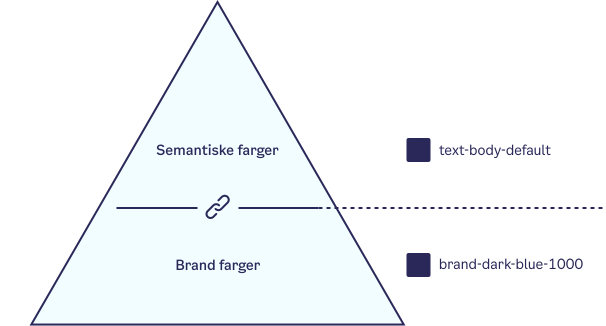
Fargesystemet består av globale farger som refererer til hva fargen er (eks. brand-dark-blue-100) og et semantisk nivå som beskriver hva fargen skal brukes til (eks. text-body-default).
Fargene har semantiske fargenavn som er bygget opp av tre ledd: UI-element - Situasjon - Variant/Tilstand. Første ledd refererer til elementet som fargelegges: Background, Surface, Border, Text, Input.
- Background: Som regel bakgrunnen på hele siden (HTML body).
- Surface: Bakgrunnsfargen til en element, som for eksempel et panel, en knapp, en seksjon, etc.
- Border: Fargen til en ramme (stroke).
- Text/Icon: Fargen på tekst og ikoner.
- Input: Farger for input-elementer (tekstfelt, select, checkbox, radio, etc.).
Brand farger
Dark blue
Dark blue 1000
--pkt-color-brand-dark-blue-1000
#2A2859
Dark blue 700
--pkt-color-brand-dark-blue-700
#6A698B
Blue
Blue 1000
--pkt-color-brand-blue-1000
#6FE9FF
Blue 500
--pkt-color-brand-blue-500
#B3F5FF
Blue 300
--pkt-color-brand-blue-300
#D1F9FF
Blue 200
--pkt-color-brand-blue-200
#E5FCFF
Blue 100
--pkt-color-brand-blue-100
#F1FDFF
Warm blue
Warm blue 1000
--pkt-color-brand-warm-blue-1000
#1F42AA
Green
Green 1000
--pkt-color-brand-green-1000
#43F8B6
Green 400
--pkt-color-brand-green-400
#C7FDE9
Light green
Light green 1000
--pkt-color-brand-light-green-1000
#C7F6C9
Light green 400
--pkt-color-brand-light-green-400
#E5FFE6
Dark green
Dark green 1000
--pkt-color-brand-dark-green-1000
#034B45
Yellow
Yellow 1000
--pkt-color-brand-yellow-1000
#F9C66B
Yellow 500
--pkt-color-brand-yellow-500
#FFE7BC
Red
Red 1000
--pkt-color-brand-red-1000
#FF8274
Red 600
--pkt-color-brand-red-600
#FFB4AC
Red 400
--pkt-color-brand-red-400
#FFDFDC
Red 100
--pkt-color-brand-red-100
#FFF2F1
Light beige
Light beige 1000
--pkt-color-brand-light-beige-1000
#F8F0DD
Dark beige
Dark beige 1000
--pkt-color-brand-dark-beige-1000
#D0BFAE
Purple
Purple 1000
--pkt-color-brand-purple-1000
#E0ADFF
Neutrals
Neutrals White
--pkt-color-brand-neutrals-white
#FFFFFF
Neutrals 50
--pkt-color-brand-neutrals-50
#F9F9F9
Neutrals 100
--pkt-color-brand-neutrals-100
#F2F2F2
Neutrals 200
--pkt-color-brand-neutrals-200
#E6E6E6
Neutrals 300
--pkt-color-brand-neutrals-300
#CCCCCC
Neutrals 400
--pkt-color-brand-neutrals-400
#B3B3B3
Neutrals 500
--pkt-color-brand-neutrals-500
#9A9A9A
Neutrals 600
--pkt-color-brand-neutrals-600
#808080
Neutrals 700
--pkt-color-brand-neutrals-700
#666666
Neutrals 800
--pkt-color-brand-neutrals-800
#4D4D4D
Neutrals 900
--pkt-color-brand-neutrals-900
#333333
Neutrals 1000
--pkt-color-brand-neutrals-1000
#2C2C2C
Neutrals Black
--pkt-color-brand-neutrals-black
#000000
Neutrals Transparent
--pkt-color-brand-neutrals-transparent
transparent
Semantiske farger
Background
Card
--pkt-color-background-card
#FFFFFF
Default
--pkt-color-background-default
#FFFFFF
Subtle
--pkt-color-background-subtle
#F9F9F9
Transparent
--pkt-color-background-transparent
transparent
Border
Beige
--pkt-color-border-beige
#D0BFAE
Blue
--pkt-color-border-blue
#6FE9FF
Default
--pkt-color-border-default
#2A2859
Gray
--pkt-color-border-gray
#CCCCCC
Green
--pkt-color-border-green
#43F8B6
Light beige
--pkt-color-border-light-beige
#F8F0DD
Red
--pkt-color-border-red
#FF8274
Subtle
--pkt-color-border-subtle
#F2F2F2
Yellow
--pkt-color-border-yellow
#F9C66B
Border states
Active
--pkt-color-border-states-active
#1F42AA
Disabled
--pkt-color-border-states-disabled
#CCCCCC
Focus
--pkt-color-border-states-focus
#E0ADFF
Hover
--pkt-color-border-states-hover
#1F42AA
Button primary
Background active
--pkt-color-button-primary-background-active
#1F42AA
Background danger
--pkt-color-button-primary-background-danger
#FF8274
Background disabled
--pkt-color-button-primary-background-disabled
#F9F9F9
Background focus
--pkt-color-button-primary-background-focus
#1F42AA
Background hover
--pkt-color-button-primary-background-hover
#1F42AA
Background normal
--pkt-color-button-primary-background-normal
#2A2859
Background success
--pkt-color-button-primary-background-success
#43F8B6
Border focus
--pkt-color-button-primary-border-focus
#1F42AA
Text active
--pkt-color-button-primary-text-active
#FFFFFF
Text disabled
--pkt-color-button-primary-text-disabled
#B3B3B3
Text focus
--pkt-color-button-primary-text-focus
#FFFFFF
Text hover
--pkt-color-button-primary-text-hover
#FFFFFF
Text normal
--pkt-color-button-primary-text-normal
#FFFFFF
Button secondary
Background active
--pkt-color-button-secondary-background-active
transparent
Background disabled
--pkt-color-button-secondary-background-disabled
#F9F9F9
Background hover
--pkt-color-button-secondary-background-hover
transparent
Border focus
--pkt-color-button-secondary-border-focus
#1F42AA
Border hover
--pkt-color-button-secondary-border-hover
#1F42AA
Border active
--pkt-color-button-secondary-border-active
#1F42AA
Border disabled
--pkt-color-button-secondary-border-disabled
#E6E6E6
Border normal
--pkt-color-button-secondary-border-normal
#2A2859
Border yellow
--pkt-color-button-secondary-border-yellow
#F9C66B
Text active
--pkt-color-button-secondary-text-active
#1F42AA
Text disabled
--pkt-color-button-secondary-text-disabled
#B3B3B3
Text focus
--pkt-color-button-secondary-text-focus
#1F42AA
Text hover
--pkt-color-button-secondary-text-hover
#1F42AA
Text normal
--pkt-color-button-secondary-text-normal
#2A2859
Button tertiary
Background active
--pkt-color-button-tertiary-background-active
#F2F2F2
Background disabled
--pkt-color-button-tertiary-background-disabled
#F9F9F9
Background focus
--pkt-color-button-tertiary-background-focus
#F2F2F2
Background hover
--pkt-color-button-tertiary-background-hover
#F2F2F2
Border focus
--pkt-color-button-tertiary-border-focus
#1F42AA
Text active
--pkt-color-button-tertiary-text-active
#1F42AA
Text disabled
--pkt-color-button-tertiary-text-disabled
#B3B3B3
Text focus
--pkt-color-button-tertiary-text-focus
#1F42AA
Text hover
--pkt-color-button-tertiary-text-hover
#1F42AA
Text normal
--pkt-color-button-tertiary-text-normal
#2A2859
Input background
Disabled
--pkt-color-input-background-disabled
#F9F9F9
Normal
--pkt-color-input-background-normal
#FFFFFF
Open
--pkt-color-input-background-open
#1F42AA
Input border
Active
--pkt-color-input-border-active
#1F42AA
Disabled
--pkt-color-input-border-disabled
#CCCCCC
Error
--pkt-color-input-border-error
#FF8274
Hover
--pkt-color-input-border-hover
#1F42AA
Normal
--pkt-color-input-border-normal
#2A2859
Input check
Background
--pkt-color-input-check-background
#FFFFFF
Border
--pkt-color-input-check-border
#2A2859
Text active
--pkt-color-input-check-text-active
#1F42AA
Text hover
--pkt-color-input-check-text-hover
#1F42AA
Input text
Active
--pkt-color-input-text-active
#1F42AA
Disabled
--pkt-color-input-text-disabled
#B3B3B3
Error
--pkt-color-input-text-error
#FF8274
Hover
--pkt-color-input-text-hover
#1F42AA
Normal
--pkt-color-input-text-normal
#2A2859
Open
--pkt-color-input-text-open
#FFFFFF
Surface default
Default
--pkt-color-surface-default-default
#F2F2F2
Faded green
--pkt-color-surface-default-faded-green
#E5FFE6
Faded red
--pkt-color-surface-default-faded-red
#FFDFDC
Gray
--pkt-color-surface-default-gray
#F2F2F2
Light beige
--pkt-color-surface-default-light-beige
#F8F0DD
Light blue
--pkt-color-surface-default-light-blue
#B3F5FF
Light green
--pkt-color-surface-default-light-green
#C7FDE9
Pale blue
--pkt-color-surface-default-pale-blue
#D1F9FF
Red
--pkt-color-surface-default-red
#FFB4AC
Yellow
--pkt-color-surface-default-yellow
#FFE7BC
Surface strong
Default
--pkt-color-surface-strong-default
#E6E6E6
Beige
--pkt-color-surface-strong-beige
#D0BFAE
Blue
--pkt-color-surface-strong-blue
#6FE9FF
Dark blue
--pkt-color-surface-strong-dark-blue
#2A2859
Dark green
--pkt-color-surface-strong-dark-green
#034B45
Gray
--pkt-color-surface-strong-gray
#E6E6E6
Green
--pkt-color-surface-strong-green
#43F8B6
Light green
--pkt-color-surface-strong-light-green
#C7F6C9
Red
--pkt-color-surface-strong-red
#FF8274
Yellow
--pkt-color-surface-strong-yellow
#F9C66B
Surface subtle
Default
--pkt-color-surface-subtle-default
#FFFFFF
Gray
--pkt-color-surface-subtle-gray
#F9F9F9
Light blue
--pkt-color-surface-subtle-light-blue
#E5FCFF
Light red
--pkt-color-surface-subtle-light-red
#FFF2F1
Pale blue
--pkt-color-surface-subtle-pale-blue
#F1FDFF
White
--pkt-color-surface-subtle-white
#FFFFFF
Tag text
Active
--pkt-color-tag-text-active
#1F42AA
Focus
--pkt-color-tag-text-focus
#1F42AA
Hover
--pkt-color-tag-text-hover
#1F42AA
Normal
--pkt-color-tag-text-normal
#2A2859
Text action
Hover
--pkt-color-text-action-active
#1F42AA
Disabled
--pkt-color-text-action-disabled
#B3B3B3
Hover
--pkt-color-text-action-hover
#1F42AA
Normal
--pkt-color-text-action-normal
#2A2859
Text body
Body dark
--pkt-color-text-body-dark
#2A2859
Body default
--pkt-color-text-body-default
#2A2859
Body light
--pkt-color-text-body-light
#FFFFFF
Text
Placeholder
--pkt-color-text-placeholder
#666666
Sass-variabler
Alle fargene er tilgjengelige som et Sass map i scss/abstracts/varaiables/_colors.scss.
$pkt-colors: (
  // Blue
  brand-blue-100: #f1fdff,
  brand-blue-200: #e5fcff,
  brand-blue-300: #d1f9ff,
  brand-blue-500: #b3f5ff,
  brand-blue-1000: #6fe9ff,
  brand-dark-blue-700: #6a698b,
  brand-dark-blue-1000: #2a2859,
  brand-warm-blue-1000: #1f42aa,
  // Green
  brand-green-400: #c7fde9,
  brand-green-1000: #43f8b6,
  brand-light-green-400: #e5ffe6,
  brand-light-green-1000: #c7f6c9,
  brand-dark-green-1000: #034b45,
  // Yellow
  brand-yellow-1000: #f9c66b,
  brand-yellow-500: #ffe7bc,
  // Red
  brand-red-100: #fff2f1,
  brand-red-400: #ffdfdc,
  brand-red-600: #ffb4ac,
  brand-red-1000: #ff8274,
  // Beige
  brand-light-beige-1000: #f8f0dd,
  brand-dark-beige-1000: #d0bfae,
  // Neutrals
  brand-neutrals-white: #ffffff,
  brand-neutrals-100: #f9f9f9,
  brand-neutrals-200: #f2f2f2,
  brand-neutrals-1000: #2c2c2c,
  brand-neutrals-black: #000000,
  brand-neutrals-transparent: transparent,
  // Purple
  brand-purple-1000: #e0adff,
  // Grays
  grays-gray-100: #e6e6e6,
  grays-gray-200: #cccccc,
  grays-gray-300: #b3b3b3,
  grays-gray-400: #9a9a9a,
  grays-gray-500: #808080,
  grays-gray-600: #666666,
  grays-gray-700: #4d4d4d,
  grays-gray-800: #333333,
  grays-gray-900: #1a1a1a,
  grays-gray-1000: #2c2c2c
) !default;
Semantiske variabler
De semantiske fargene beskriver hva variablene er ment å brukes til. Fargenavnet er bygget opp av tre ledd: UI-element, situasjon, variant/tilstand.
Første ledd refererer til elementet som fargelegges: background, Surface.
- Background: Som regel bakgrunnen på hele siden (HTML body).
- Surface: Bakgrunnsfargen til en element, som for eksempel et panel, en knapp, en seksjon, etc.
- Border: Fargen til en ramme (stroke).
- Text/Icon: Fargen på tekst og ikoner.
- Input: Farger for input-elementer (tekstfelt, select, checkbox, radio, etc.).
Dette er våre semantiske variabler:
$pkt-semantic-colors: (
  // Background
  background-card: map.get($pkt-colors, brand-neutrals-white),
  background-default: map.get($pkt-colors, brand-neutrals-white),
  background-subtle: map.get($pkt-colors, brand-neutrals-100),
  background-transparent: map.get($pkt-colors, brand-neutrals-transparent),
  // Borders
  border-default: map.get($pkt-colors, brand-dark-blue-1000),
  border-beige: map.get($pkt-colors, brand-dark-beige-1000),
  border-blue: map.get($pkt-colors, brand-blue-1000),
  border-gray: map.get($pkt-colors, grays-gray-200),
  border-green: map.get($pkt-colors, brand-green-1000),
  border-light-beige: map.get($pkt-colors, brand-light-beige-1000),
  border-red: map.get($pkt-colors, brand-red-1000),
  border-subtle: map.get($pkt-colors, brand-neutrals-200),
  border-yellow: map.get($pkt-colors, brand-yellow-1000),
  border-states-active: map.get($pkt-colors, brand-warm-blue-1000),
  border-states-disabled: map.get($pkt-colors, grays-gray-300),
  border-states-focus: map.get($pkt-colors, brand-purple-1000),
  border-states-hover: map.get($pkt-colors, brand-warm-blue-1000),
  // Surface
  surface-default-faded-green: map.get($pkt-colors, brand-light-green-400),
  surface-default-faded-red: map.get($pkt-colors, brand-red-400),
  surface-default-gray: map.get($pkt-colors, brand-neutrals-100),
  surface-default-light-beige: map.get($pkt-colors, brand-light-beige-1000),
  surface-default-light-blue: map.get($pkt-colors, brand-blue-300),
  surface-default-light-green: map.get($pkt-colors, brand-green-400),
  surface-default-red: map.get($pkt-colors, brand-red-600),
  surface-default-yellow: map.get($pkt-colors, brand-yellow-500),
  surface-strong-beige: map.get($pkt-colors, brand-dark-beige-1000),
  surface-strong-blue: map.get($pkt-colors, brand-blue-1000),
  surface-strong-dark-blue: map.get($pkt-colors, brand-dark-blue-1000),
  surface-strong-dark-green: map.get($pkt-colors, brand-dark-green-1000),
  surface-strong-gray: map.get($pkt-colors, brand-neutrals-200),
  surface-strong-green: map.get($pkt-colors, brand-green-1000),
  surface-strong-light-green: map.get($pkt-colors, brand-light-green-1000),
  surface-strong-red: map.get($pkt-colors, brand-red-1000),
  surface-strong-yellow: map.get($pkt-colors, brand-yellow-1000),
  surface-subtle-light-blue: map.get($pkt-colors, brand-blue-200),
  surface-subtle-light-red: map.get($pkt-colors, brand-red-100),
  surface-subtle-pale-blue: map.get($pkt-colors, brand-blue-100),
  surface-subtle-white: map.get($pkt-colors, brand-neutrals-white),
  // Text
  text-body-dark: map.get($pkt-colors, brand-dark-blue-1000),
  text-body-default: map.get($pkt-colors, brand-dark-blue-1000),
  text-body-light: map.get($pkt-colors, brand-neutrals-white),
  text-placeholder: map.get($pkt-colors, grays-gray-600),
  text-action-disabled: map.get($pkt-colors, grays-gray-600),
  text-action-active: map.get($pkt-colors, brand-warm-blue-1000),
  text-action-hover: map.get($pkt-colors, brand-warm-blue-1000),
  text-action-normal: map.get($pkt-colors, brand-dark-blue-1000),
  // Input
  input-background-normal: map.get($pkt-colors, brand-neutrals-white),
  input-border-active: map.get($pkt-colors, brand-warm-blue-1000),
  input-border-disabled: map.get($pkt-colors, grays-gray-300),
  input-border-error: map.get($pkt-colors, brand-red-1000),
  input-border-hover: map.get($pkt-colors, brand-warm-blue-1000),
  input-border-normal: map.get($pkt-colors, brand-dark-blue-1000),
  input-text-active: map.get($pkt-colors, brand-warm-blue-1000),
  input-text-disabled: map.get($pkt-colors, grays-gray-500),
  input-text-hover: map.get($pkt-colors, brand-warm-blue-1000),
  input-text-normal: map.get($pkt-colors, brand-dark-blue-1000),
  input-text-error: map.get($pkt-colors, brand-red-1000),
  input-text-open: map.get($pkt-colors, brand-neutrals-white),
  // Input - Checkbox/Radio spesifikke
  input-check-background: map.get($pkt-colors, brand-neutrals-white),
  input-check-border: map.get($pkt-colors, brand-dark-blue-1000),
  input-check-text-active: map.get($pkt-colors, brand-warm-blue-1000),
  input-check-text-hover: map.get($pkt-colors, brand-warm-blue-1000)
) !default;
CSS-variabler
Disse fargene gjøres tilgjengelig i frontend med et prefix --pkt-color, som CSS custom properties.
:root {
  --pkt-color-brand-dark-beige-1000: #d0bfae;
  --pkt-color-brand-light-beige-1000: #f8f0dd;
  --pkt-color-brand-blue-1000: #6fe9ff;
}

/* Brukes enkelt der du ønsker */
.eksempel {
  background: var(--pkt-color-brand-dark-beige-1000);
}
CSS-hjelpeklasser
Fargene er også tilgjengelige som hjelpeklasser i CSS. Disse kan brukes direkte i HTML. De forskjellige fargene er tilgjengelige som klasser med prefikset pkt-color-bg-, pkt-color-txt- og pkt-color-border- etterfulgt av fargenavnet. Disse klassene kan brukes for både brandfarger og semantiske farger. For de semantiske fargene ser muligens klassene litt rare ut, men dette er et resultat av at alt er automatisk generert ut fra alle tilgjengelige farger.
<div class="pkt-color-bg-surface-default-faded-green">
  <p class="pkt-color-txt-text-body-dark">Dette er en tekst</p>
  <aside class="pkt-color-border-border-green">Sidetekst</aside>
</div>
SCSS funksjon
Du kan også ta i bruk farge-stilene slik:
@use "sass:map";
@use "@oslokommune/punkt-css/dist/scss/abstracts/variables";

.wrapper {
  background-color: map.get(variables.$pkt-colors, "brand-red-1000");
}
Kontrast
Alle farger bør testes for kontrast ved å bruke en online kontrastkontroll for å sikre at den oppfyller WCAG AA-krav for tilgjengelighet. Dette kan du gjøre via plugins i Figma, på nett eller du kan ta i bruk kontrastsjekkeren under.
13.58
Stor tekst - 18pt/24px
Oslo er kjent for sin bærekraftige livsstil, med et omfattende nettverk av sykkelstier og et førsteklasses kollektivtransportsystem.
Normal tekst - 16px
Oslo er kjent for sin bærekraftige livsstil, med et omfattende nettverk av sykkelstier og et førsteklasses kollektivtransportsystem. Mat- og drikkeopplevelsene er varierte og spenner fra Michelin-stjerne restauranter til koselige kafeer som serverer deilige kanelboller og kaffe.
Tilgjengelighet for fargeblinde
Det er en god idé å teste fargene du planlegger å bruke med en fargeblindesimuleringsapp, for eksempel Color Oracle. Du kan bruke simuleringen til å justere fargekombinasjonene for å være tilgjengelige.